


Hey there 👋, I’m Bryan
Welcome to my newsletter. I share practical advice and tackle tough questions on putting AI to work. Thank’s for being here! Send me your questions and in return I’ll humbly offer actionable real-talk advice 🤜🤛
This week I asked Copilot to build me an action tracker in Excel, and as someone who spends significant time with premium AI tools (too many $200/mo subscriptions!), I was not impressed.
Copilot created the action tracker, and then saved the file to OneDrive. A few prompts later, when I tried to edit the file, Copilot told me it no longer had access to it 🤔. It turns out, Copilot couldn’t access or modify the file it had created just a moment ago, and in an effort to be helpful, offered to create an entirely new file (version control, anyone?). All I had to do was download the original and upload it to the chat.
What the free Copilot couldn’t do
I can’t think of a clearer example that highlights how important context is for AI to work properly and provide real productivity gains, as opposed to wasting time and building frustration. Context is the data and tools an AI has access to in order to effectively complete a job.
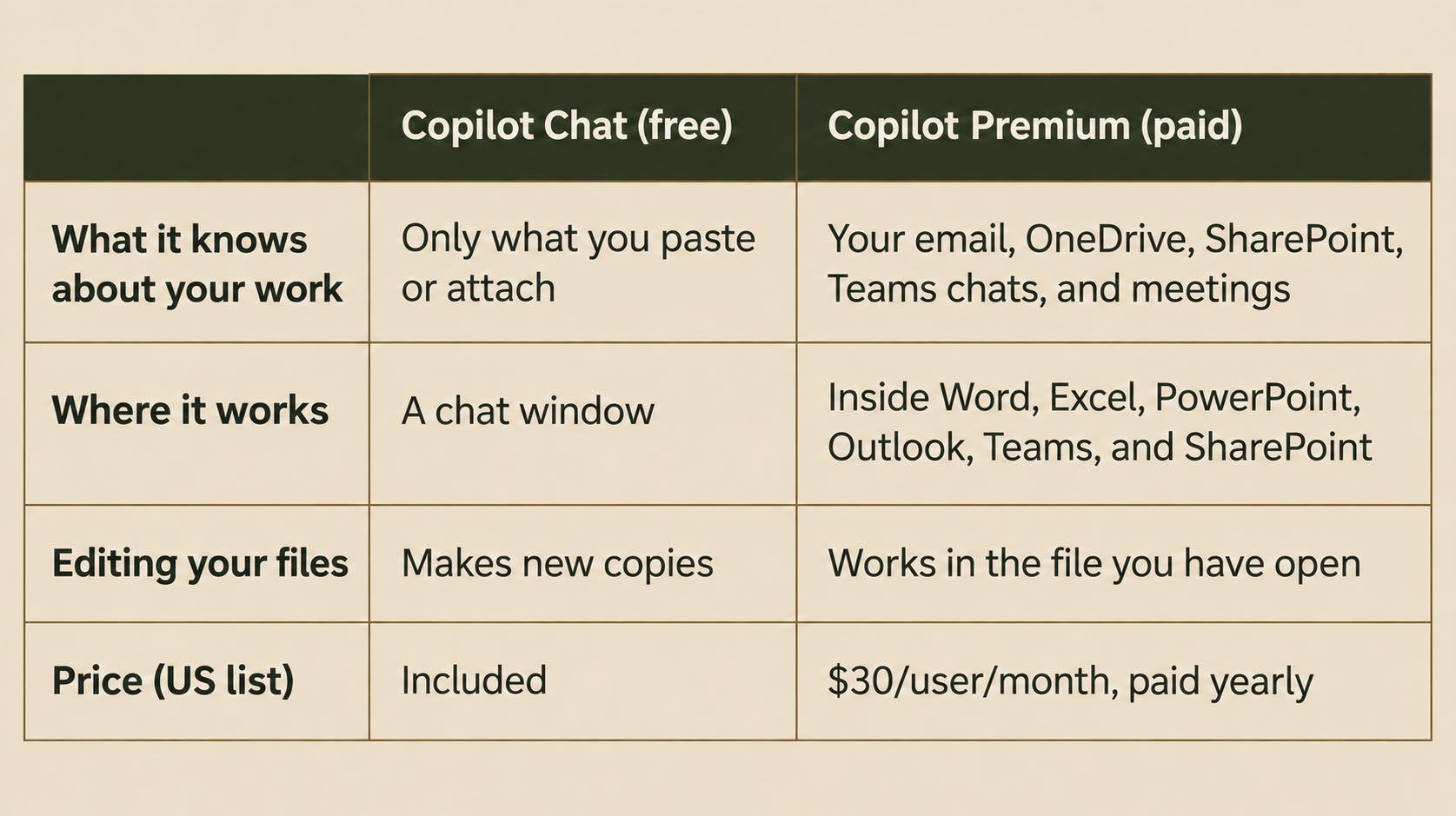
This was the first of several frustrations with the free version. Not only could Copilot not see anything in my OneDrive, but Excel, PowerPoint, Word, and the rest of the O365 Suite have no Copilot integration on the free plan. Copilot is effectively on an island. It doesn’t know anything about the scope of my work, my company’s goals, or literally anything beyond its generic training data. Its limitations make it practically useless.
Compared to the premium AI tools I use every hour of every day, this was an extremely weak experience. But why?
I confirmed that I had a full Office license; however, the paid Microsoft 365 Copilot isn’t included in the package, and most companies don’t hand it out by default.
Copilot is the front door
Most mid-size and large companies run on either Microsoft or Google, and for the ones on Microsoft, Copilot is the digital front door to AI for employees. Microsoft 365 has more than 450 million paid business seats, but fewer than 7% provide paid Copilot to employees, which means a free AI tool is the cornerstone of many companies’ AI transformation strategy.
Here’s what I think leaders are missing. Even though the paid version runs on largely the same AI, it adds the secret sauce: context. Think of the free version as a personal assistant… on their first day. They might be highly skilled, but they won’t reach their full potential until they have access to your email, your files, your meeting notes, your team’s SharePoint sites, and the apps you already use.
My before and after
Back to my action tracker workbook in Excel. Here’s how that task went once the full license for Copilot Premium came through.
After a request to IT, Copilot showed up in Excel pretty much immediately, though I quickly noticed that I didn’t need to open Excel at all. In Copilot Cowork (a premium feature), I typed “/” to pull up the action tracker file, described the updates I wanted in plain language, and Copilot updated the file directly. One file, no copies. The same “/” pulled up every file I needed.
Then I took it a step further and asked Copilot to keep my action tracker updated from my meeting notes, Teams chats, and emails. That’s the whole difference in one example. The free version couldn’t open a file it had just created. The paid version keeps that file current from everywhere my work happens without me even needing to open it.
It helped in ways I didn’t expect, too. I could find company policies just by asking in chat. For most issues, I’ll never have to email someone and wait for an answer, saving company time for both me and the person I would have asked.
The biggest win was my calendar. I used Copilot to schedule all my meetings for the week. I loathe trying to find available times on people’s calendars, especially when I have multiple meetings to schedule. So I had Copilot do it for me. It found available time on calendars, sent invites, flagged when someone declined, and found an alternate time. That saved me well over an hour of calendar searching and back-and-forth.
You might be underselling AI to your people
If Copilot Chat is how your company is letting employees try AI, they are using the weakest version available.
Your employees aren’t fooled. Most of them can tell it’s underpowered. The trouble is what they conclude from the experience. Let’s look closely at three employees.
Employee A has never used AI outside of work. Since they have never tried a powerful version with full access to the necessary context, they may run into a frustration similar to the one I encountered with OneDrive files. They decide AI is overhyped and not very useful. They keep doing great work, but without the added benefits of a powerful tool. When leadership asks how the AI rollout is going, the answer is lukewarm.
Employee B uses paid AI tools outside of work and fully understands AI’s potential. When the approved company tool can’t keep up, the obvious move is to paste work into the tools they already like and use. In healthcare, finance, or anywhere with sensitive data, that’s a risk. Their chosen tool helps with their work, but it still isn’t integrated into the company ecosystem, meaning that if/when they leave your company, whatever agents or workflows they’ve created go with them.
Employee C understands the limitations (and risks) to using their own personal AI tools at work, and they demand better. Because you are limiting access to more powerful models, they are actively considering leaving your company to find an employer who will so they can improve their AI skills and stay relevant in a rapidly changing space.
The bigger your company, the weaker the free version
Since April 15, 2026, Microsoft has removed Copilot from Word, Excel, PowerPoint, and OneNote for employees without a paid license at organizations with more than 2,000 Microsoft 365 seats. Those employees still get Copilot Chat in the Copilot app and Copilot in Outlook, but the Copilot panel inside the apps where they actually work is gone. I would argue employees at the largest companies have the most to gain from AI. As leaders, keep in mind their feedback will be based on the thinnest, most watered-down version Microsoft offers.
The missed opportunity
If you’re a Microsoft shop, the beauty is that your people’s work already lives in a contained ecosystem: OneDrive, SharePoint, Excel, PowerPoint, Word, Outlook, and Teams. Paid Copilot is wired into all of it. As an experienced transformation leader, I cannot stress enough how valuable this is. You have no integration project ahead of you, no data migration, and you likely already have a business associate agreement with Microsoft that includes support for the enterprise controls you need, like data-loss prevention, prompt/response records, and retention.
Here’s what a connected Copilot might look like on any given day:
Excel: instantly build a formula for your workbook, analyze the data, and flag outliers.
Outlook: summarize a long thread, identify to-dos, and draft a reply that reflects what was already agreed upon.
Teams: recap a meeting with decisions and action items.
PowerPoint: turn a Word doc or a set of files into a first-draft deck.
SharePoint and OneDrive: ask questions across your team’s documents, and build pages and dashboards from lists and files (Copilot in SharePoint and OneDrive reached general availability starting September 30, 2026).
Big buyers are deploying widely: The University of Pittsburgh Medical Center is among the companies that have bought 60,000 or more seats. The National Health Service (NHS) England is extending Copilot to 505,000 clinicians and staff. Microsoft says Copilot’s weekly engagement is now on par with Outlook and Teams, and that customers now reach high usage within days of buying licenses. Being skilled with Copilot will become table stakes, the same way Excel proficiency is expected.
The cost is close to moot compared to productivity gains, but it can still be an initial hit to the bottom line
Microsoft 365 Copilot Premium lists at $30 per user per month, billed on an annual commitment, so $360 per seat annually. It sits on top of your base license. The Enterprise E3 Tier is the “corporate baseline” and costs $39, bringing the all-in cost to $69 per month. You pay for the base license either way, so the real decision is whether to spend the added $30.
What does your people’s time cost? The latest data from the Bureau of Labor Statistics puts total compensation for full-time private-sector workers at $54 per hour worked in June 2026. That’s wages plus benefits, or about $0.90 per minute.
$30 a month ÷ $0.90 a minute ≈ 33 minutes a month, or about 8 minutes a week.
A seat pays for itself if it saves an employee only 8 minutes of work per week, or under two minutes each workday. Averaging across all private-sector workers ($46.89 an hour), you could safely estimate around 9 minutes per week.
For comparison, NHS England reports its Copilot trial saved employees an average of 43 minutes a day. Even if your organization’s results land at a fraction of that, the math still works in your favor by a wide margin.
That doesn’t make the up-front costs cheap at scale. For a 10,000-person company, Premium for everyone is $3.6 million a year, paid on an annual commitment. Agents can add more: licensed staff using internal agents are mostly covered, but agents used by unlicensed employees or customers bill by usage, and that cost is hard to predict. This is a real commitment, and the savings come back as time.
But if you look at it like any other core tool, a company doesn’t decide whether to give employees Excel or a laptop based on efficiency alone. These days, it’s just what the work requires. AI is heading the same way, and fast. Treat it as an optional perk and your workforce will fall behind the companies that treat it as standard equipment.
How to ensure it pays off
If AI is becoming standard equipment, the question is how to make every seat earn its place. A major failure point in any internal AI rollout is when employees don’t use the tool. A good rule to follow to limit unnecessary costs: training unlocks spend, and proven value earns more. $30/mo is the base price, and you can unlock additional usage limits by paying more. That structure works well if you manage it purposefully:
Train before you assign. Require training on safe, efficient use as a condition for getting a license. Employee A needs to know what the tool can do before the seat can pay off.
Ask what it’s for. Use the license request as an opportunity to gather helpful information about your team, including what AI tools they use today, current use cases, and expected time saved.
Treat the usage limit as a conversation. When someone hits their usage cap, ask them what they’re working on and why the limit falls short. Most increases will be small and easy to approve, and that conversation is where you weigh cost against benefit.
Check back every 60 to 90 days. Ask each user to name one weekly task Copilot does for them. If they aren’t using Copilot regularly, follow up again or reassign the seat at renewal.
Set a company-wide cap. Individual increases should add up to a budget you chose, not one you discover.
Spend should grow only as capability and value grow with it.
So here’s the question for every CEO running on Microsoft: are you willing to commit real money to a tool whose cost is easy to see and whose return is spread across thousands of small moments? Companies that make that investment, then measure it, will learn what AI can actually do for them. The ones that don’t will keep judging AI by its weakest version.
Thanks for reading!
Sincerely,
Bryan 👋
PS - Let me know in the comments if you found this newsletter helpful. Your feedback would mean the world to me 🙏
Know someone that would benefit from this newsletter? Feel free to forward this to them.